

Why Do iPhones Have 3 Ways To Answer Calls?
From Trevor Nace · · 4 min
The player loads from YouTube only when you click. It uses YouTube's privacy-enhanced mode.
If the video does not play, the owner may have turned off embedding. Watch it on YouTube instead.
Description
Download the full PDF guide for this video (free): https://trevornace.com/why-do-iphones-have-3-ways-to-answer-calls/
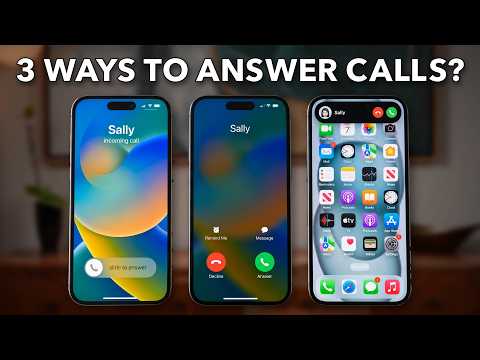
Your iPhone has three different ways to answer or decline a call, and each one is there for a reason.
This video explains why a locked iPhone shows Slide to Answer to prevent pocket dials, why an unlocked iPhone shows Answer and Decline buttons instead, and how to choose a full-screen call or a banner in the Phone app's Incoming Calls setting.
It also covers the difference between silencing a call with any side button, sending it straight to voicemail with a double press, and swiping a call banner away. Shown on an iPhone running iOS 27.
0:00 3 Ways To Answer Calls 0:10 The Three Call Screens 0:35 Locked Vs Unlocked Calls 2:05 Choose How Calls Show Up 2:41 Decline Or Silence A Call
MORE HELP iPhone 101 course (free waitlist): https://trevornace.com/ All my step-by-step guides: https://trevornace.com/blog/ Have an Android phone? Check out my Android channel: https://www.youtube.com/@trevorsandroid Subscribe: https://www.youtube.com/@TrevorNace?sub_confirmation=1 TikTok: https://www.tiktok.com/@trevornace1 Facebook: https://www.facebook.com/trevornace10/ Instagram: https://www.instagram.com/trevornaceyoutube
I hope this video helped. If you're still stuck, leave a comment below and I'll try to help.