

Pro Skin Sharpening with Hidden Frequency Separation Trick! - Photoshop Tutorial
From PiXimperfect · · 7 min
The player loads from YouTube only when you click. It uses YouTube's privacy-enhanced mode.
If the video does not play, the owner may have turned off embedding. Watch it on YouTube instead.
Description
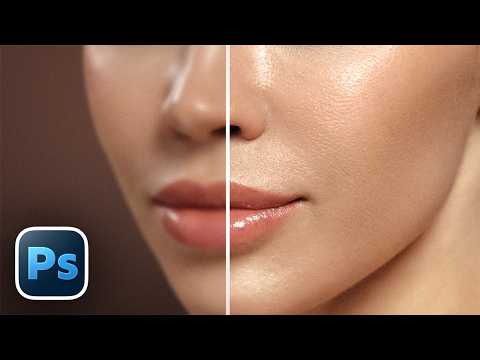
Discover an easy trick hidden inside Frequency Separation to beautifully sharpen skin texture in Photoshop! 🚀 Join PiXimperfect Pro - The Ultimate Photoshop Training Course: https://pix.live/pro
In this tutorial, learn how to enhance and sharpen the skin naturally and use selective sharpening to make the subject stand out. We will learn how to extract the sharpening layer using Frequency Separation and use blend if with advanced masking to add depth with sharpening. I hope this video helps you. Thank you so much for watching :)
► Students Offer: Get Photoshop along with 20+ licensed apps + AI features with Creative Cloud Pro, at a special discounted price: https://pix.live/photoshop
► DOWNLOADS: Frequency Separation Action: https://pix.live/fsaction Sample Images: https://pix.live/skinsharpsample Finished PSDs: https://pix.live/skinsharppro (Only for PiXimperfect Pro Members)
► TIMESTAMPS: 00:00 The Skin Sharpen Trick Intro 02:33 Masking and Sharpening Focus 03:15 Enhancing Highlights 04:58 Focus on the Edges 06:25 See the Difference Yourself
► RECOMMENDED SOFTWARE & CREATIVE RESOURCES: ✅ The Best A.I. Powered High-End Portrait Retouching Plugins: https://pix.live/retouch4me ✅ Official PiXimperfect Compositing Plugin: https://pix.live/pixcomposite ✅ Unlimited Photoshop Actions, Plugins, Brushes, Assets, etc: https://pix.live/envato ✅ Music Used in PiXimperfect Videos: https://pix.live/music
► THE GEAR I USE: ✅ My Graphic Tablet: https://pix.live/wacompro ✅ Recommended Budget Tablet: https://pix.live/wacomlite ✅ Primary Microphone: https://pix.live/mic1 ✅ Budget Microphone: https://pix.live/mic2 ✅ Audio Interface: https://pix.live/audiointerface ✅ Camera: https://pix.live/camera ✅ Lens: https://pix.live/lens
► LET'S CONNECT: Instagram: https://www.instagram.com/piximperfect Facebook: http://facebook.com/piximperfect Twitter: https://twitter.com/piximperfect