

Power Query #4: How to Unpivot Columns with Table.UnpivotOtherColumns function
From excelisfun · · 20 min
The player loads from YouTube only when you click. It uses YouTube's privacy-enhanced mode.
If the video does not play, the owner may have turned off embedding. Watch it on YouTube instead.
Description
Download Zipped folder with files: https://excelisfun.net/files/PowerQuery04Files.zip Free Power Query YouTube class from Mike excelisfun Girvin: https://www.youtube.com/playlist?list=PLrRPvpgDmw0lHaJfr4mjRcOMEYqKKvKBj Buy Mike Girvins Power Query M Code book: https://www.amazon.com/Transformative-Magic-Power-Query-Excel/dp/1615470832/ or Mr Excel: https://www.mrexcel.com/products/the-transformative-magic-of-power-query-m-code-in-excel-and-power-bi/
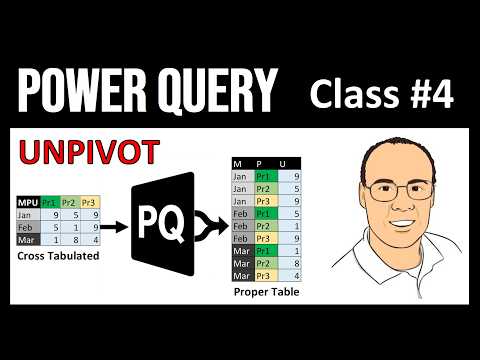
Topics: 1. (00:00) Intro Song 2. (00:11) Introduction 3. (00:36) Tentative List of Videos for the Power Query Class 4. (01:04) Look at data for this video 5. (01:43) Goal for Examples 1 and 2 6. (02:09) What is a Cross Tabulated (Cross Tab) Table? 7. (02:43) How is a Cross Tabulated translated into a Proper Table? 8. (03:11) Files used in this video 9. (03:28) Example 1: Unpivot cross tabulated table with 1 column and 1 row headers variables 10. (03:46) Convert table to an Excel Table 11. (04:27) Bring Excel Table from current workbook into Power Query Editor 12. (05:26) Excel.CurrentWorkbook function 13. (05:48) Unpivoting and the Table.UnpivotOtherColumns Function 14. (07:07) Edit M Code in formula bar to rename columns 15. (07:19) M Code List Value in second argument of the Table.UnpivotOtherColumns Function 16. (08:33) Advanced Editor and the let expression 17. (09:07) Close and Load to the Excel worksheet 18. (09:35) Use Query Output Table to analyze: Sort, Create PivotTable and Chart 19. (11:50) Example 2: Unpivot cross tabulated table with 2 column and 1 row headers variables 20. (15:25) Example 3: How to unpivot in Power BI Desktop 21. (18:44) Uncheck Enable Load in the Power Query Editor in Power BI Desktop 22. (19:06) Summary 23. (19:34) Mike Girvin’s Power Query M Code book 24. (19:43) Closing
This video has subtitles or audio translations in these 135 languages: Abkhazian, Afar, Afrikaans, Akan, Albanian, Arabic, Armenian, Assamese, Aymara, Azerbaijani, Bambara, Bangla, Bangla (India), Bashkir, Basque, Belarusian, Bhojpuri, Bosnian, Breton, Bulgarian, Burmese, Cantonese, Cantonese (Hong Kong), Catalan, Chinese, Chinese (China), Chinese (Hong Kong), Chinese (Singapore), Chinese (Taiwan), Corsican, Czech, Danish, Dogri, Dutch, Dutch (Belgium), Dutch (Netherlands), Estonian, Faroese, Fijian, Filipino, Finnish, French, French (Belgium), French (Canada), French (France), French (Switzerland), Georgian, German, German (Austria), German (Germany), German (Switzerland), Greek, Guarani, Gujarati, Hebrew, Hindi, Hungarian, Icelandic, Indonesian, Italian, Japanese, Khmer, Korean, Kurdish, Lao, Latin, Latvian, Lithuanian, Luxembourgish, Macedonian, Maithili, Malagasy, Malay, Malay (Singapore), Malayalam, Maltese, Mongolian, Nepali, Norwegian, Papiamento, Pashto, Persian, Persian (Afghanistan), Persian (Iran), Polish, Portuguese, Portuguese (Brazil), Portuguese (Portugal), Punjabi, Romanian, Russian, Samoan, Sango, Sanskrit, Santali, Scottish Gaelic, Serbian, Serbian (Cyrillic), Serbian (Latin), Sicilian, Sindhi, Sinhala, Slovak, Slovenian, Somali, Spanish, Spanish (Latin America), Spanish (Mexico), Spanish (Spain), Spanish (United States), Sundanese, Swahili, Swati, Swedish, Tajik, Tamil, Tatar, Telugu, Thai, Tibetan, Tigrinya, Tongan, Tsonga, Tswana, Turkish, Turkmen, Ukrainian, Urdu, Uyghur, Uzbek, Venda, Vietnamese, Welsh, Western Frisian, Zulu. Click gear icon below video to set subtitles, audio and language.
#excelisfun #MikeGirvin #PowerQuery #Excel #PowerBI #PowerBIDesktop #Excel365 #LearnPowerQuery #freeclass #DataAnalysis #BusinessIntelligence #Microsoft #TableUnpivotOtherColumns #freepowerquerycourse #powerquerycourse #powerqueryclass #freecourse #unpivot #crosstab #Table.UnpivotOtherColumns #mcode #cleandata #transformdata #unpivottable #unpivotcolumns